Running LLMs at home
04/05/202632 views
Some months ago, I started playing with LM Studio on my MacBook Pro M3 Max. 48 GB of unified memory sounded like plenty until I actually tried running models alongside everything else I keep open. Multitasking is how I work: dozens of windows, browser tabs everywhere, background apps. LM Studio worked for getting a feel for what 30B-class models could do, but it was not a usable daily setup.
I already have a Kubernetes cluster running across three Lenovo ThinkCentre M920q boxes, plus a NAS and networking gear. The whole rack averages around 200W at idle. I did not want to blow past that with a dedicated AI machine. LLMs are not known for being power efficient. The big ones run in data centers with hundreds of servers pulling the electricity of a small city. I needed something that fit my desk, my power budget, and my actual budget.
I started with the part I did not understand well enough yet: what actually matters when you run LLMs on local hardware.
Inference basics
Model loading and the KV cache
Before inference starts, all model weights must be loaded into GPU memory, or sharded across GPUs if using tensor parallelism. You can calculate the baseline memory required:
Memory (GB) = num_parameters × bytes_per_parameter × (1 + overhead)| Precision | Bytes per param | 30B model |
|---|---|---|
| FP32 | 4 | 120 GB |
| FP16 / BF16 | 2 | 60 GB |
| INT8 / FP8 | 1 | 30 GB |
| INT4 | 0.5 | 15 GB |
At FP16, a 30B model needs 60 GB just for the weights. That does not fit on a 24 GB card.
Once inference begins, memory consumption continues to grow due to the KV cache. Every token in the conversation history stores key and value vectors across every layer. A simplified formula:
KV Cache Size (bytes) = 2 × batch_size × seq_len × num_layers × hidden_dim × bytes_per_paramTake a 30B model with 64 layers, hidden dimension 5120, and a 4096-token conversation in FP16:
2 × 1 × 4096 × 64 × 5120 × 2 = 5,368,709,120 bytes ≈ 5.0 GBThat is 5 GB of KV cache on top of the model weights. An 8K-token conversation doubles it to ~10 GB. Multiple requests scale it linearly with batch size. A 24 GB GPU can run a 30B model at Q4 with 15 GB for the weights, but a long conversation or concurrent requests can eat the remaining 9 GB fast.
KV cache compression is an active area. TurboQuant shrinks the cache by rotating key and value vectors before quantizing them, trading a small PPL hit for much lower memory. PlanarQuant and IsoQuant improve on the rotation with simpler block-diagonal transforms that are both faster and better quality. In their results, 10.3x compression cuts 288 MB at 8K context down to 28 MB. DFLASH attacks the same problem from the attention-compute side. These are all still landing in llama.cpp at the time of writing.
Prefill
When you send a prompt, the model processes every input token simultaneously. This phase is called prefill, and it is compute-bound. It builds the initial KV cache.
Prompt: "What is the capital of France?"

Tokens: [What] [is] [the] [capital] [of] [France]

        all prompt tokens in one batched forward pass
        ------------------------------------------------>

        GPU work: high parallelism, compute-bound

        output: initial KV cache
        layer 0..N: K/V entries for every prompt token
        reused later so the prompt is not recomputed
Both GPUs and CPUs can run LLM inference, but GPUs are preferable because they are built for parallel work. A CPU with many cores can run small models, but it will not keep up with anything larger than a few billion parameters.
Decode
After prefill finishes, generation begins. The model produces one token at a time, autoregressively. Each new token is fed back as input for the next step. Unlike prefill, decode is memory-bandwidth-bound: the model must load its entire weight set from VRAM to calculate a single output token.
For each generated token:

VRAM weights        KV cache             Output
60 GB read/token    prompt + generated   1 token
      |                    |                |
      v                    v                v
  [load weights] --> [attend cache] --> [sample token]
                                           |
                                           v
                                  append token K/V
                                           |
                                           +--> next step

Decode repeats this loop once per token. The weight read is
why generation is usually memory-bandwidth-bound.
With a 30B model at FP16, that is roughly 60 GB of weight traffic per generated token. At 4 tokens per second, you are pushing about 240 GB per second just for decoding, plus whatever the KV cache needs. This is why memory bandwidth matters more than raw TFLOPS for generation speed on anything larger than a tiny model.
An RTX Pro 6000 has 1792 GB/s of memory bandwidth. For a 30B FP16 model with 60 GB of weights, the best-case theoretical ceiling is 1792 / 60 ≈ 30 tokens per second. Compare that to a DGX Spark with 273 GB/s: 273 / 60 ≈ 4.5 tokens per second best case. The DGX Spark has more total memory (128 GB vs 96 GB on the RTX Pro 6000), but its bandwidth is low enough that large models crawl during generation.
One way around the bandwidth wall is Multi-Token Prediction. Instead of producing one token per forward pass, MTP predicts several at once using a lightweight head that proposes candidates the main model verifies in a single pass. vLLM already supports MTP. For llama.cpp it is still a draft at the time of writing, but PR #22673 is already promising enough that I benchmark it later in this post.
Update, May 17 2026: that PR has since been merged.
The hardware options
Once I understood the constraints, I looked at what was actually available:
| System | Maker | Compute (FP16 est.) | Memory | Bandwidth |
|---|---|---|---|---|
| RTX Pro 6000 Blackwell | NVIDIA | ~250 TFLOPS | 96 GB | 1792 GB/s |
| RTX 5090 | NVIDIA | ~210 TFLOPS | 32 GB | 1792 GB/s |
| Mac Studio M3 Ultra | Apple | ~72 TFLOPS* | 96 GB base, up to 512 GB | 819 GB/s |
| Mac Studio M4 Max | Apple | ~40 TFLOPS* | 36 GB base, up to 128 GB | 546 GB/s |
| Mac mini M4 Pro | Apple | ~20 TFLOPS* | 16 GB base, up to 64 GB | 273 GB/s |
| DGX Spark | NVIDIA | ~125 TFLOPS* | 128 GB | 273 GB/s |
| Ryzen AI Max / Strix Halo | AMD | ~30 TFLOPS* | 128 GB | 256 GB/s |
Apple and AMD GPU TFLOPS are estimated from known core counts and clock speeds. The table normalizes compute to estimated FP16 by doubling FP32 estimates. DGX Spark's published number is 1 PFLOP FP4 tensor performance with sparsity, converted here to roughly 125 TFLOPS FP16 equivalent.
My strictest requirement was energy consumption, followed by price. I also did not want a system-on-chip. SoCs like the Mac Studio or Strix Halo have the compute and memory glued together permanently. If the GPU ages out or you want more VRAM later, you replace the whole machine.
The DGX Spark was the only SoC I considered seriously, mostly because NVIDIA's software stack around AI is the most mature one. But it is still a $4k-$5k machine, it is ARM, and long-term support depends heavily on NVIDIA caring about it for years. With AI moving this fast, I could not justify spending that much and betting on one sealed box. I prefer a modular system where I can swap parts if better hardware shows up in a few months or years. I would still buy a DGX Spark if I had $4k to throw at it, or if someone is kind enough to give me one, hit me up.
AMD's ROCm is still catching up, and Apple will not let me run Linux on their machines, which rules them out for anything I want to integrate into my cluster.
I wanted something modular and power-efficient. That eliminated most tower workstations and traditional GPU rigs.
The build
Minisforum launched the MS-02 Ultra mini PC, and it checked the right boxes. It is small, quite efficient, and has a PCIe 5.0 x16 slot plus two additional expansion slots, which is a lot of expandability for its form factor. It takes up to 4 SODIMM sticks for a maximum of 256 GB of RAM, and up to 4 NVMe SSDs with one running at PCIe 5.0 speeds. Nothing is soldered down, except the Intel 285 HX CPU itself.
For the GPU, I went with the RTX Pro 4000 SFF. It is from NVIDIA's Blackwell generation, and SFF means small form factor: the card fits inside the MS-02 chassis without any case or GPU cooler mods. It has 24 GB of GDDR7 ECC, uses a PCIe 5.0 x8 electrical link, and uses little power compared to its bigger siblings.
The rest: 96 GB of DDR5 RAM and a 2 TB NVMe drive.
Since the card only uses x8 lanes, the x16 slot has room for later expansion. I could add a second GPU with either a bifurcation riser or an MCIO adapter, though that would need a custom 3D-printed case. For now, one GPU is plenty.
Software stack
For the inference engine, I picked llama.cpp. It runs on practically everything, supports every quantization format I care about, and the community is active enough that new models get supported quickly.
On top of llama.cpp I put llama-swap. It acts as a proxy that loads models on demand. You define multiple models in its config, and when a request arrives for a model that is not loaded, it swaps out the current one and loads the new one. When you have 24 GB of VRAM and a few models you rotate between, this matters. Each model has different strengths, and you cannot keep them all resident at once.
llama-swap also supports multiple backend peers. I run one peer on my Kubernetes cluster as a lightweight proxy whose only job is to send the Wake-on-LAN packet when a request arrives. The other peer runs on the AI machine with the GPU and handles inference.
...
qwen3.6-35b-a3b:
  cmd: |
    /app/llama-server \
    --host 0.0.0.0 \
    --port ${PORT} \
    --model /models/Qwen3.6-35B-A3B-Q4_K_P.gguf \
    --mmproj /models/Qwen3.6-35B-A3B-mmproj-f16.gguf \
    --ctx-size 262144 \
    --jinja \
    --cache-type-k q8_0 \
    --cache-type-v q8_0 \
    --temp 1.0 \
    --top-p 0.95 \
    --top-k 64 \
    --min-p 0 \
    --presence-penalty 0 \
    --reasoning-budget 10000 \
    --reasoning-budget-message "...I got enough. Let's answer now." \
    --flash-attn on \
    --fit on
  useModelName: qwen3.6-35b-a3b
  concurrencyLimit: 120

qwen3.6-27b:
  cmd: |
    /app/llama-server \
    --host 0.0.0.0 \
    --port ${PORT} \
    --model /models/Qwen3.6-27B-Q4_K_M.gguf \
    --mmproj /models/Qwen3.6-27B-mmproj-F16.gguf \
    --ctx-size 131072 \
    --jinja \
    --cache-type-k q8_0 \
    --cache-type-v q8_0 \
    --temp 0.6 \
    --top-p 0.95 \
    --top-k 20 \
    --min-p 0.0 \
    --presence-penalty 1.5 \
    --repeat-penalty 1.0 \
    --reasoning-budget 10000 \
    --reasoning-budget-message "...I got enough. Let's answer now." \
    --flash-attn on \
    --n-gpu-layers 99
  useModelName: qwen3.6-27b
  concurrencyLimit: 120
...
matrix:
  vars:
    q3627b: qwen3.6-27b
    q3635b: qwen3.6-35b-a3b
    emb: embeddings
  sets:
    default: "(q3627b | q3635b) & emb"
With the machine idling at around 30W, GPU included, I still did not love having it on all the time. So I built llama-suspendd, with some AI help. It watches llama-swap for activity and, after a configurable idle timeout, sends the machine to sleep. When a new request arrives, llama-swap's proxy sends a Wake-on-LAN packet to bring it back up.
The wake cycle adds latency, but it is a compromise I can live with. I am not doing real-time anything here, and I would rather wait a few seconds than pay for 30W of idle power 24/7.
llama-suspendd also checks a few extra signals before sleeping: active SSH sessions, so it does not kick me out while I am doing maintenance or adding new models, and GPU utilization from nvidia-smi, in case something else on the GPU is running. That last one has already saved me from interrupting a fine-tuning job I forgot was in progress.
Observability
Something I learned while turning my homelab into something closer to production infrastructure is that observability is not optional. You need to know what is running, how fast, and what is falling over.
The category I ended up looking at was AI gateways, which in this setup mostly means a proxy with auth, routing, logging, and a dashboard. LiteLLM is one of the bigger ones. I tried it for a day. It uses a lot of memory at idle, and it suffered a supply chain attack a few weeks before I was evaluating it. Neither inspired confidence.
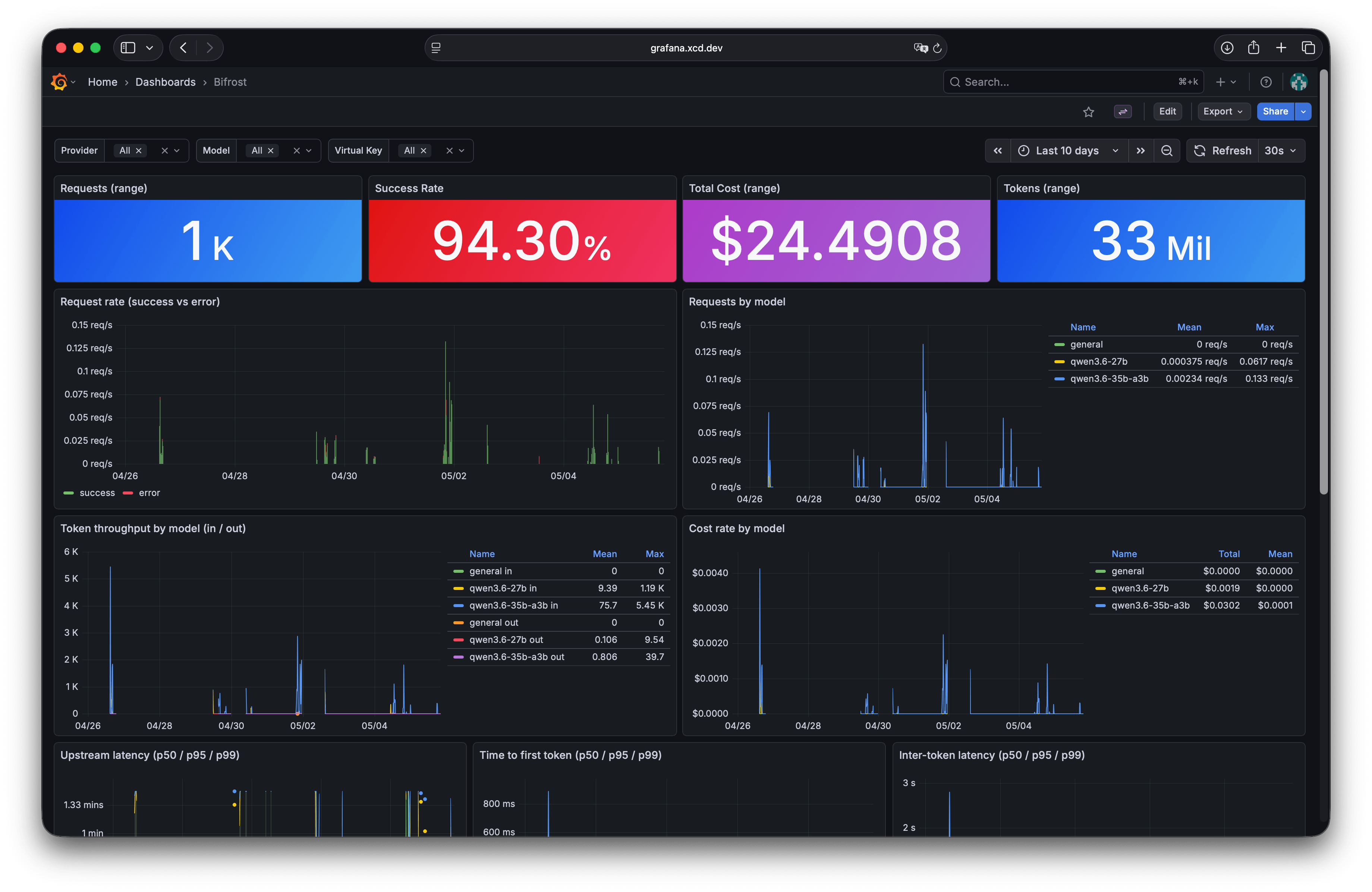
I landed on Bifrost instead. It is written in Go, which I have been liking a lot lately. It does not use much memory, and the web UI is clean. It exposes Prometheus metrics natively, and after a few prompts I had a Grafana dashboard showing request latency, throughput, token counts, and error rates.
What it looks like in practice
The setup is useful enough that I have been using local models with OpenCode and Hermes Agent, not just poking at benchmarks. The models are definitely not state of the art, but they are good enough to feel real. Getting this kind of performance from a roughly 30B parameter model at home would have felt unrealistic a few months ago.
I built and ran llama-bench with llama.cpp:
- CUDA:
13.2 - GPU arch: Blackwell
120a - GPU: RTX PRO 4000 Blackwell SFF, 24 GB
- Repetitions:
5 - Shared params:
-ctk q8_0 -ctv q8_0 -fa 1 -b 2048 -ub 512
| Model | Quantization | pp 512 tok/s | pp 2048 tok/s | tg 128 tok/s | tg 512 tok/s | VRAM used |
|---|---|---|---|---|---|---|
| qwen3.6 27B | Q4_K_M | 807.91 | 796.19 | 19.52 | 18.58 | ~15.7 GB |
| qwen3.6 35B A3B | Q4_K_P | 2029.75 | 1983.92 | 102.20 | 95.50 | ~21.9 GB |
ppis prompt processing, or prefill, measured with 512 or 2048 input tokens.tgis token generation, or decode, measured while generating 128 or 512 output tokens.
The 35B model is MoE/A3B: it has 35B total parameters, but only about 3B active per token because each token routes through a small subset of experts. That is why decode is much faster than the dense 27B.
I also tested a 27B MTP build based on llama.cpp PR #22673, using Qwen3.6-27B-MTP-Q4_K_M:
| Mode | pp 512 tok/s | pp 2048 tok/s | tg 128 tok/s | tg 512 tok/s |
|---|---|---|---|---|
| MTP off | 684.68 | 761.61 | 19.44 | 18.99 |
| MTP on, draft max 3 | 504.72 | 578.93 | 28.13 | 24.47 |
| Change | -26.3% | -24.0% | +44.7% | +28.9% |
MTP trades slower prefill for faster decode. In this run, acceptance was about 70% for
tg 128and 59% fortg 512, which is why generation speeds up but does not simply triple.
A few months ago, this setup would have felt a lot less realistic. The hardware did not change that much. The software did. Quantization got better, KV cache work keeps moving, MoE models are more common, and MTP is starting to show real gains.
That is what I find exciting here. Not the usual AI hype, but the steady stream of small optimizations that make local inference less painful. If MTP lands cleanly in llama.cpp, this same box gets noticeably faster without me changing any hardware.
For me, that is enough. The machine sleeps most of the time, wakes up when OpenCode or Hermes Agent needs it, and gives me local inference without turning my rack into a space heater. It is not replacing hosted models for everything, but it is useful enough to stay in my workflow.